How Much NAS Storage Do You Actually Need?
How much NAS storage you need depends on your use case. Real numbers for 4K video, photo libraries, backups, and small business files to plan correctly.
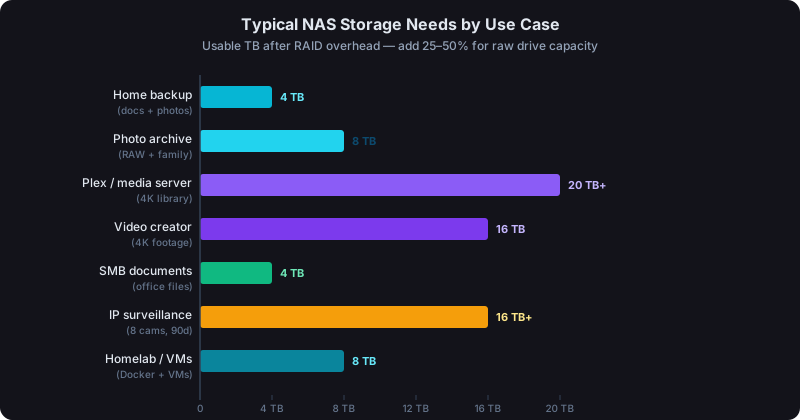
For a home media server with 4K content, plan for at least 20TB usable. A photo-heavy household typically needs 4–8TB. Small businesses handling documents and backups start at 8TB and grow from there. These figures are usable capacity after RAID overhead. Your raw drive total will be higher.
Most people buying a NAS underestimate how much storage they'll actually use. The ones who over-estimate usually sleep better. Here's how to work through the numbers before buying drives.
Start With What You Already Have
Before estimating future needs, measure what you own today. A few quick checks:
- Windows: right-click each drive → Properties → "Used space"
- Mac: Apple menu → About This Mac → Storage tab
- External drives: plug in and check total used space
- Existing NAS: check current volume utilization in DSM
Add those numbers up. That's your baseline. Most people discover they have 2–6TB they'd want on a NAS. Before accounting for growth.
4K Video: The Storage Hog
Video is the fastest way to fill a NAS. The format matters enormously:
| Format | Approximate Size per Hour |
|---|---|
| 1080p H.264 (high quality) | 8–15 GB |
| 4K H.264 (smartphone) | 20–30 GB |
| 4K H.265/HEVC (modern mirrorless) | 12–20 GB |
| 4K ProRes (cinema cameras) | 100–200 GB |
| 4K Blu-ray rip (uncompressed) | 50–80 GB |
One hour of 4K H.265 footage averages around 25 GB. That's the figure worth memorizing for planning. A decent Plex library with 200 4K movies at H.265 quality runs 3,000–4,000 GB. Roughly 4TB for movies alone. Add a few TV series and you're at 8–12TB quickly. Home theater setups with full Blu-ray-quality rips regularly hit 40–80TB.
If you're shooting your own footage. Drone video, family events, travel. Budget 500GB to 2TB per year depending on your camera. A Sony A7 IV shooting 4K H.265 generates roughly 12GB per hour of footage.
Photos: Smaller Than You Think, Until It's Not
Modern cameras produce 24–50 megapixel RAW files. A single shoot of 500 images can generate 12–15 GB.
- 1,000 RAW photos from a full-frame mirrorless camera ≈ 25–30 GB
- A family photo library spanning 20 years with 50,000+ images ≈ 400–800 GB
- Smartphone photos: at 3–8 MB per HEIC file, a family with 4 phones generates 10,000–30,000 photos/year ≈ 30–240 GB/year
For most households, 1–2TB covers years of photo history. Professional photographers shooting RAW should budget 2–4TB per year for active work, plus archive space.
Music: A Non-Issue for Most
A large lossless (FLAC) music library, 5,000 albums. Runs roughly 500GB to 2TB depending on bitrate. For most people, this barely registers compared to video. Not worth over-provisioning for.
Backups: Budget 2× to 3× Your Primary Data
A NAS used as a backup destination needs more space than the data it protects, because versioning keeps multiple copies of changed files. Synology Hyper Backup compresses and deduplicates, but you should still budget generously.
Rule of thumb: backup volume = 2× the data you're protecting, minimum. If you're backing up 5TB of files from multiple machines, plan for at least 10TB of backup space on the NAS.
Time Machine backups from Macs are famously storage-hungry. A MacBook with a 512GB SSD can grow a Time Machine backup to 1–2TB over time as it accumulates version history.
Small Business File Storage
Needs vary enormously by industry:
- Professional services (accounting, legal, consulting): Documents, PDFs, spreadsheets. A decade of files might be 100–500 GB. Storage isn't the constraint.
- Design and creative agencies: Large InDesign files, PSDs, video assets. 2–10 TB per year is common.
- Medical and dental practices: Patient imaging (X-rays, CBCT) generates 1–5 GB per patient. A 500-patient practice needs 500GB to 2.5TB for imaging alone.
- Construction and real estate: Site photos, video walk-throughs, drawings. 1–5 TB per active year.
- IP surveillance: The biggest driver of small business storage. At 1080p continuous H.265 recording, one camera generates 15–25 GB per day. Eight cameras = 120–200 GB/day = 3.6–6 TB/month. With 90-day retention, you're looking at 10–18 TB for surveillance alone.
A Practical Sizing Guide
| User Type | Starting Usable Storage | 3-Year Projected Need |
|---|---|---|
| Home file backup (docs, photos) | 2–4 TB | 4–8 TB |
| Home media server (streaming library) | 8–16 TB | 20–40 TB |
| Photographer (RAW archive) | 4–8 TB | 10–20 TB |
| Videographer / content creator | 8–20 TB | 20–50 TB |
| Small business documents only | 2–4 TB | 4–8 TB |
| Small business + surveillance | 8–16 TB | 20–40 TB |
These are usable capacity targets after RAID overhead.
Accounting for RAID Overhead
Whatever usable capacity you need, your raw drive total will be higher. RAID 5 with four equal drives gives you 75% of raw capacity. RAID 6 gives you 50%. SHR varies depending on drive sizes.
If you need 16TB usable and plan to run RAID 5 with four equal drives:
- You need 16TB ÷ 0.75 = ~21.3TB raw
- Four 6TB drives = 24TB raw → 18TB usable. Just enough headroom ✓
Calculate your usable storage for your specific drive count and RAID type before buying. The overhead numbers are easy to get wrong.
Buy for Now, Plan for Later
NAS units are designed to expand. A DS923+ filled with 4×8TB drives in RAID 5 gives you 24TB usable. When you need more, replace drives one at a time with 12TB or 16TB units and let DSM expand the pool automatically.
Practical advice: buy enough drives to meet today's needs at a size one step below your maximum budget. Don't fill a 4-bay NAS with 4×4TB drives if you expect to need 30TB in two years. You'll replace all four drives anyway. Start with 4×8TB and upgrade from there.
For the mechanics of how expansion actually works, see the Synology NAS drive expansion guide. If you're still deciding which RAID type makes the most sense for your setup, the full Synology RAID types comparison breaks down the trade-offs with real capacity numbers.