Synology RAID Types Compared: SHR, RAID 5, RAID 6, and More
Compare all Synology RAID types: SHR, RAID 5, RAID 6, RAID 10, and more. With real capacity examples using 4×4TB drives.
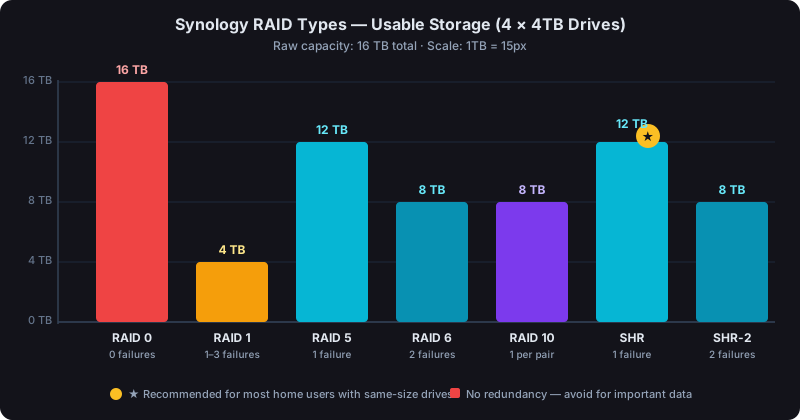
With 4×4TB drives, RAID 5 gives you 12TB usable, RAID 6 gives 8TB, RAID 10 gives 8TB, and SHR gives 12TB (identical to RAID 5 when all drives are the same size). Your best choice depends on how many drives you have and whether you plan to mix sizes later.
The Synology RAID Types, Explained
Synology DSM supports more RAID configurations than most NAS platforms. That's great for flexibility, but it also means you need to pick the right one from the start. Because changing RAID type later means a full rebuild or migration.
Here's what's actually available:
- RAID 0: No redundancy, all capacity used, any drive failure = total data loss
- RAID 1: Full mirror, 50% usable capacity, survives one drive failure
- RAID 5: Distributed parity, one drive of capacity lost, survives one drive failure
- RAID 6: Double parity, two drives of capacity lost, survives two simultaneous failures
- RAID 10: Mirrored pairs, 50% usable, requires even number of drives, fast
- SHR (Synology Hybrid RAID): Synology's own algorithm, optimized for mixed drive sizes
- SHR-2: SHR with double parity, survives two drive failures
Capacity Comparison: 4×4TB Drives
Let's put real numbers on this. With four 4TB drives (16TB raw):
| RAID Type | Usable Capacity | Drive Failures Tolerated | Notes |
|---|---|---|---|
| RAID 0 | 16 TB | 0 | No protection at all |
| RAID 1 | 4 TB | 1 (up to 3 with 4 drives) | Only 2-drive configs use full mirroring |
| RAID 5 | 12 TB | 1 | Sweet spot for 4+ drives |
| RAID 6 | 8 TB | 2 | Better safety, less space |
| RAID 10 | 8 TB | 1 per pair | Fast random I/O |
| SHR | 12 TB | 1 | Matches RAID 5 with identical drives |
| SHR-2 | 8 TB | 2 | Matches RAID 6 with identical drives |
You can calculate your usable storage for any combination of drives to see exactly what you'd get.
RAID 0: Only for Scratch Storage
RAID 0 stripes data across all drives for maximum speed and capacity. You get every byte of raw storage, and reads/writes are fast. But any single drive failure destroys everything.
Don't use RAID 0 for anything you care about. It's useful for video editing scratch disks or caching tiers where data is temporary. On a NAS that's storing your photos, documents, or business data, it's a mistake.
RAID 1: Simple, Safe, Expensive
RAID 1 mirrors your data. Every write goes to two drives simultaneously. You lose half your capacity but get a straightforward, well-understood protection scheme.
It's most practical in 2-bay NAS units. In a 4-bay NAS, you'd want RAID 5 or SHR instead, since you're sacrificing 75% of your capacity just to protect against one drive failure.
RAID 5: The Standard for 4+ Drive Arrays
RAID 5 is the most common choice for home users and small businesses with 4 or more drives. One drive's worth of capacity goes to distributed parity. The math that lets you reconstruct data if any single drive fails.
With 4×4TB drives, you get 12TB usable. That's a good trade-off: one drive of protection (4TB), three drives of real storage (12TB). Rebuild times on a typical spinning hard drive array run 12–48 hours depending on drive size and NAS load.
The downside: if a second drive dies during a rebuild (which is the highest-risk window), you lose everything. If that risk concerns you, look at RAID 6.
RAID 6: Two Drive Failures, Less Capacity
RAID 6 uses double parity. Two drives of capacity are consumed by protection data. With 4×4TB, you get 8TB usable instead of 12TB, but you can survive two simultaneous drive failures.
For production environments, archival data, or arrays with 6+ large drives, RAID 6 is worth the capacity trade. Rebuild times are longer than RAID 5, and the risk window (a third failure during a double-drive rebuild) is much lower.
See how SHR-2 compares to RAID 6 for Synology-specific arrays.
RAID 10: Performance Without Sacrificing Safety
RAID 10 combines mirroring and striping. Pairs of drives are mirrored, then striped together. You get the speed of RAID 0 with the safety of RAID 1.
The cost is 50% of your capacity. With 4×4TB drives, you get 8TB. That matches RAID 6 in space but beats it on random write performance. RAID 10 is popular for databases and workloads with high write throughput.
It requires an even number of drives, and you can only lose one drive per mirrored pair. If both drives in a pair fail, you lose the array.
SHR: Synology's Smart Solution for Mixed Drives
SHR is where Synology differs from standard RAID. It's designed to maximize usable capacity when you're mixing drive sizes. Something traditional RAID handles poorly.
With identical drives, SHR behaves exactly like RAID 5 (or RAID 6 for SHR-2). The difference shows up with mixed sizes.
Example: a 2TB + 3TB + 4TB + 4TB array.
- RAID 5 would treat all drives as if they were 2TB (the smallest), giving you 6TB usable.
- SHR allocates storage more intelligently, giving you roughly 9TB usable.
That's a meaningful difference if you're expanding an older NAS with new, larger drives. Our RAID storage calculator handles SHR calculations so you can see the exact numbers before committing.
SHR vs SHR-2: When You Need Double Protection
SHR-2 is SHR with double parity, analagous to the RAID 6 vs RAID 5 relationship. It requires a minimum of 4 drives and sacrifices two drives' worth of capacity for the ability to survive two simultaneous failures.
If your NAS holds irreplaceable data and you don't have an external backup, SHR-2 is worth considering. Also worth saying plainly: RAID is not a substitute for backups. No RAID level protects you from ransomware, accidental deletion, or a house fire.
Choosing the Right Type
A few decision rules that work for most situations:
- 2-bay NAS, same-size drives → RAID 1
- 4-bay NAS, same-size drives, want capacity → RAID 5 or SHR
- 4-bay NAS, mixing drive sizes → SHR
- Want to survive two failures → RAID 6 or SHR-2
- High write performance matters → RAID 10
- Expandable array with mixed drives over time → SHR
When you're ready to run the numbers yourself, try a few configurations side-by-side. The capacity differences are significant enough that they should inform your drive purchase decisions before you buy.
One More Thing: JBOD
Synology also supports JBOD (Just a Bunch of Disks), which combines drives into a single volume with no redundancy and no striping benefit. It's not really a RAID type. It's just a way to pool storage. Avoid it for anything important.
For a deeper comparison on the two most commonly confused types, see SHR vs RAID 5 on Synology.