RAID 5 vs RAID 6 on Synology: When Two Parity Drives Matter
RAID 5 vs RAID 6 on Synology compared with real capacity numbers. When the extra parity drive is worth losing 8-16TB of usable storage.
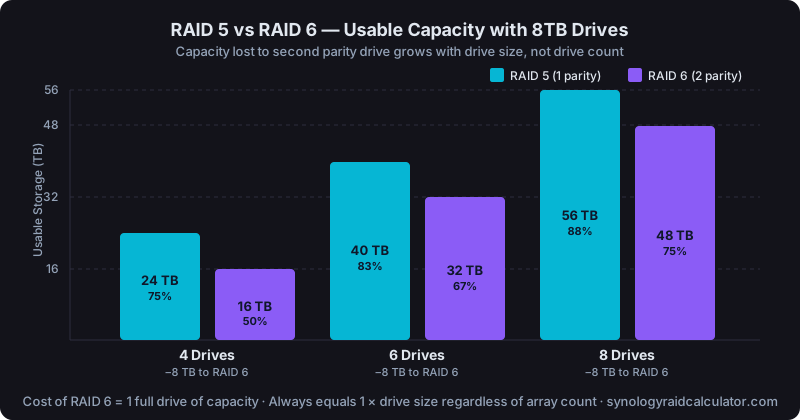
RAID 6 survives two simultaneous drive failures; RAID 5 survives one. With 4 drives, RAID 6 costs you 25% more capacity and isn't worth it for most home users. At 6-8 drives with large drives or mixed SMR risk, RAID 6 becomes a serious consideration.
Both RAID levels protect against drive failure, but they make very different tradeoffs between capacity, protection, and rebuild risk. The decision isn't complicated once you understand the actual numbers.
The Capacity Difference, in Real Numbers
RAID 5 uses one drive's worth of space for parity. RAID 6 uses two. Everything else scales with your drive count.
Here's what that looks like with 8TB drives:
| Drive Count | RAID 5 Usable | RAID 6 Usable | Capacity Lost to RAID 6 |
|---|---|---|---|
| 4 drives | 24 TB (75%) | 16 TB (50%) | 8 TB |
| 6 drives | 40 TB (83%) | 32 TB (67%) | 8 TB |
| 8 drives | 56 TB (88%) | 48 TB (75%) | 8 TB |
With 12TB drives instead, that 8 TB gap becomes a 12 TB gap. The cost of the second parity drive scales with drive size. For a 6×8TB array, choosing RAID 6 over RAID 5 means giving up 8TB of usable storage (a full drive's worth) in exchange for surviving an additional failure.
You can verify these numbers for your exact drive count and size with our RAID storage calculator.
What RAID 5's Single Parity Actually Means
In RAID 5, parity data is distributed across all drives in the array. If one drive fails, the controller reconstructs data on the fly by calculating from the remaining drives. The array stays online and readable. But it's now running "degraded" with zero fault tolerance until the failed drive is replaced and rebuilt.
That rebuild is the risk window. During a rebuild, every remaining drive is read end-to-end at sustained throughput. A 4TB drive takes 8-15 hours under typical NAS load; a 16TB drive can take 36-72 hours. If a second drive fails during that window, RAID 5 is done. You've lost the array.
The critical question is: how likely is a second drive to fail during rebuild? That depends on drive age, brand, and whether your drives were all bought in the same batch (same failure curve).
When RAID 5 Is Sufficient
4-bay NAS with drives under 8TB: The rebuild window is short enough that a second failure is statistically unlikely with quality CMR drives. WD Red Plus or IronWolf drives bought from a reputable retailer have low infant mortality rates, and if they've survived their first year, they're unlikely to fail coincidentally during a 10-hour rebuild.
Home use with cold or warm data: If the NAS mostly serves media that lives elsewhere (e.g., you have cloud backups), a degraded array for 24 hours while you wait for a replacement drive is annoying but not catastrophic.
6-bay arrays under 6TB per drive: Same math applies. Shorter rebuild times shrink the risk window.
When you already have a backup: If Hyper Backup is running nightly to a cloud destination or external drive, RAID level becomes less critical as a data protection mechanism. RAID is not a backup, but if you have a real backup, RAID 5 buys you uptime and convenience, not data survival.
When RAID 6 Makes Sense
Large drives (12TB+) in a 6+ bay array: A 16TB drive rebuild at 50-80 MB/s takes 56-89 hours. Three to four days with zero fault tolerance, on drives that are likely all the same age and model, is genuinely risky. RAID 6 keeps you protected throughout.
8+ bay arrays: At 8 drives, RAID 5 gives you 88% efficiency and RAID 6 gives you 75%. The capacity gap is smaller in percentage terms. More importantly, more drives means more chances for a coincidental second failure during rebuild. The math favors RAID 6 here.
SMR drives you couldn't avoid: SMR drives (like WD Red non-Plus 2-6TB) are notoriously slow to rebuild. A 4TB SMR drive can take 40+ hours versus 10-12 for CMR. That extended window makes RAID 6 much more valuable as insurance.
Business-critical data where downtime matters: If the NAS holds customer data, company files, or surveillance footage that can't be reconstructed from another source, the 8TB you give up for RAID 6 is cheap insurance.
Rebuild Time: A Key Factor in the Decision
Rebuild time is proportional to drive size and inversely proportional to available I/O bandwidth. Synology NAS units typically rebuild at 50-100 MB/s under moderate load.
| Drive Size | Approximate Rebuild Time (RAID 5) |
|---|---|
| 4 TB | 11-22 hours |
| 8 TB | 22-44 hours |
| 12 TB | 33-67 hours |
| 16 TB | 44-89 hours |
RAID 6 rebuild times are similar for the first failure, slightly longer for the second (since it's recalculating two sets of parity). But the key point is that RAID 6 keeps your array protected during that entire window: RAID 5 doesn't.
For a deeper look at what to expect after a drive fails, Synology RAID rebuild time covers the numbers and what to do during the wait.
SHR-2: Synology's RAID 6 Equivalent
Synology's SHR-2 (Synology Hybrid RAID 2) is functionally equivalent to RAID 6 but handles mixed drive sizes the same way SHR handles single parity. With identical drives, SHR-2 and RAID 6 give the same usable capacity.
SHR-2 is worth choosing over RAID 6 if you anticipate replacing drives with different-size units over time. With same-size drives in a fixed configuration, RAID 6 is simpler to reason about.
The Decision Framework
Start with your drive count and size:
- 4 bays, drives ≤8TB: RAID 5 (or SHR). Short rebuild window, adequate protection.
- 4 bays, drives ≥12TB: Consider RAID 6. Rebuild time exceeds 33 hours.
- 6 bays, any size: RAID 6 is worth evaluating. The capacity hit is only one drive out of six (17%).
- 8+ bays: RAID 6 strongly recommended. The rebuild risk window at this drive count is long enough to matter.
If you're on the fence, calculate your usable storage for both RAID types and see if you can live with the RAID 6 capacity. If you have 6×8TB drives, losing 8TB to go from RAID 5 to RAID 6 means choosing between 40TB and 32TB usable. Whether that's acceptable depends entirely on your storage needs.
What About RAID 10?
RAID 10 (striped mirrors) offers faster rebuild times than RAID 5 or 6, since a rebuild only needs to copy one mirror partner instead of recalculating parity across all drives. The cost is 50% capacity. Identical to RAID 1 regardless of how many drives you add. For a 6-bay NAS with RAID 10, you'd get only 24TB usable from 6×8TB drives.
RAID 10 makes sense in performance-sensitive environments (databases, VMs with heavy random I/O) where the throughput benefit of striping justifies the capacity cost. For file storage and media serving, RAID 5 or RAID 6 is almost always the better choice.
The Bottom Line
RAID 6 isn't always better. It's a specific tradeoff. You're giving up one full drive of capacity in exchange for surviving a second failure during the (potentially very long) rebuild window. For small arrays with small drives, that's often not worth it. For large arrays with large drives, it absolutely is.
Check the full breakdown of Synology RAID types if you're still weighing all your options, including RAID 1, RAID 10, and SHR variants.