SHR vs RAID 5 on Synology: Which Should You Choose?
SHR vs RAID 5 on Synology: when they give identical results, when SHR wins with mixed drives, and which to pick for your setup.
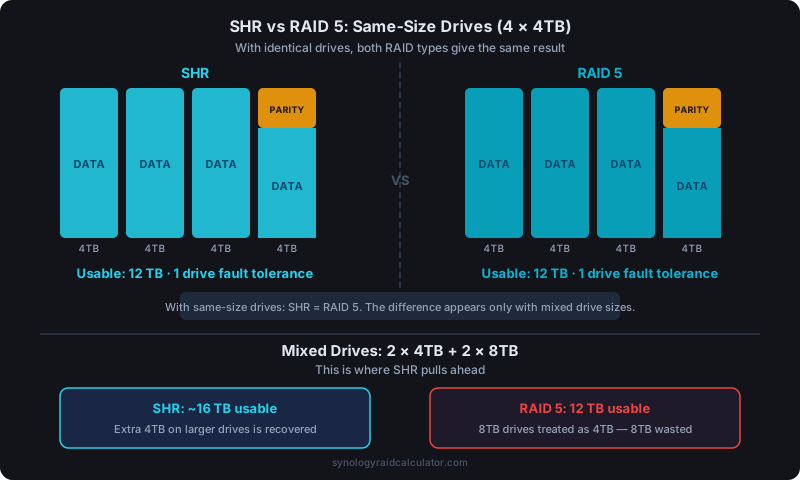
With same-size drives, SHR and RAID 5 give you exactly the same usable capacity and fault tolerance. SHR wins when you mix drive sizes. It can recover up to several terabytes of capacity that RAID 5 would waste. If you ever plan to expand with different-sized drives, SHR is the safer long-term choice.
They're Not as Different as You'd Think
Most Synology setup guides treat SHR and RAID 5 as competing options, but they're really solving the same problem in slightly different ways. Both protect against a single drive failure. Both use distributed parity. Both give you n-1 drives of usable capacity when all drives are the same size.
The real difference only shows up with mixed drive sizes. And that's where the choice actually matters.
When They're Identical: Same-Size Drives
Put four 4TB drives in a Synology NAS, configure SHR, configure RAID 5. You get 12TB usable either way. One drive's worth of capacity (4TB) goes to parity, three drives (12TB) are available for your data.
Fault tolerance is the same: one drive failure, and you're fine. You've got a degraded array until you replace the failed drive and the rebuild completes.
Performance characteristics are also very close. RAID 5 has a slight edge in write performance on some workloads because its striping is simpler, but in real-world NAS usage (media streaming, file serving, backups) you won't notice the difference.
Use our RAID storage calculator to confirm the usable capacity for your specific drive configuration.
When SHR Wins: Mixed Drive Sizes
This is where it gets interesting. Suppose you have a 4-bay Synology NAS and you're expanding an older array. You've got two old 4TB drives and you want to add two new 8TB drives.
Here's what each RAID type does with 2×4TB + 2×8TB:
RAID 5 with mixed drives: RAID 5 constrains every drive to the size of the smallest drive in the array. So your 8TB drives are treated as if they were 4TB. You get 4×4TB effective, 12TB usable. The extra 8TB of physical storage on your larger drives is completely wasted.
SHR with mixed drives: SHR allocates storage in segments and pairs drives intelligently. It uses the 4TB of the larger drives that matches the smaller drives for parity, then creates a separate RAID 1 mirror from the leftover 4TB on each 8TB drive. Result: approximately 16TB usable, 4TB more than RAID 5, recovered from storage you'd otherwise throw away.
That's a real difference. 4TB of free storage on drives you already own.
You can see this side-by-side by running the numbers yourself. Enter different drive combinations and compare SHR vs RAID 5 output directly.
The Expandability Argument
One of SHR's strongest advantages is incremental expansion. With RAID 5, you typically need to replace drives with equal or larger drives to grow your array, and the expansion process is rigid.
SHR handles expansion more gracefully. You can:
- Replace a single drive with a larger one and let DSM absorb the extra capacity automatically
- Add new drives of different sizes and have SHR slot them into the most efficient configuration
- Grow the array over time without needing to commit to a single drive size
For home users who buy drives opportunistically (grabbing 6TB drives on sale, then 8TB drives a year later), SHR's flexibility is genuinely useful. You don't need to plan your entire storage future on day one.
The Case for Sticking with RAID 5
RAID 5 has two legitimate advantages.
First, it's a standard. RAID 5 is implemented identically across every NAS platform, every operating system, and every hardware controller. If your Synology NAS dies and you need to recover data from the drives in another device, RAID 5 data is readable. SHR uses a Synology-specific implementation. Recovering SHR data outside of a Synology system requires extra steps.
Second, RAID 5 is predictable. If you're disciplined about always buying the same drive size (and many IT environments are), RAID 5 is simpler to reason about. Every drive in the array is identical, parity is straightforward, and there's no proprietary algorithm to understand.
For home labs or small businesses with consistent purchasing habits, RAID 5 is a perfectly reasonable choice. For the mixed-drive flexibility most home users want, SHR is better.
What About RAID 6 vs SHR-2?
The same logic applies one level up. SHR-2 is to RAID 6 what SHR is to RAID 5. Identical with same-size drives, more efficient with mixed sizes, and Synology-specific in its implementation.
If double-fault tolerance matters to you, SHR-2 gives you that protection while still handling mixed drive sizes better than RAID 6. See the full breakdown in our Synology RAID types comparison.
A Real Decision Framework
Choose SHR if:
- You have or plan to have mixed drive sizes
- You want to expand your NAS incrementally over time
- You're a home user with no cross-platform recovery requirements
- You want Synology's recommended default for most setups
Choose RAID 5 if:
- All your drives are and will remain the same size
- You want standard RAID for potential cross-platform data recovery
- You're in an IT environment with formal drive purchasing standards
- Performance predictability matters more than expansion flexibility
There's no universally wrong answer here. The mistake is choosing RAID 5 with an intent to mix drive sizes later. At that point, you're throwing away capacity that SHR would have used.
Don't Forget: Neither Protects Your Data from Everything
Whether you go SHR or RAID 5, you're protected against a single drive hardware failure. You're not protected against ransomware, accidental file deletion, power surges that kill multiple drives simultaneously, or physical disasters.
RAID is not a backup. That's worth understanding before you finalize your storage setup. Use Synology's Hyper Backup alongside whatever RAID type you choose.
For guidance on expanding your array after you've set it up, the Synology NAS drive expansion guide walks through the process step by step.