Synology DS923+ vs DS723+: Which NAS Fits Your Storage Needs?
Synology DS923+ vs DS723+: the 4-bay vs 2-bay decision explained with real specs, expandability limits, RAID options, and who should buy which.
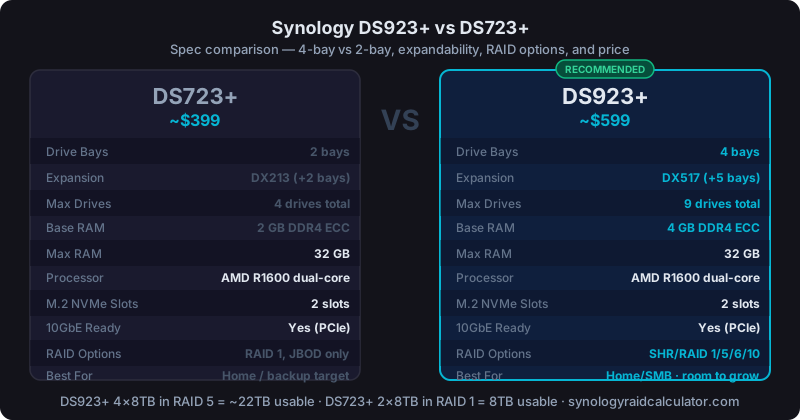
The DS723+ is a capable 2-bay NAS for $399 that works well as a home server or personal backup device. The DS923+ at $599 adds two more bays and expansion unit support. If you'll ever want more than 36TB usable storage, the DS923+ is the one to buy.
Both units share the same processor and run identical software. The differences come down to bay count, expandability, and the storage configurations each one makes practical. Here's how to think through the choice.
Specs Side by Side
| Spec | DS723+ | DS923+ |
|---|---|---|
| Price | ~$399 | ~$599 |
| Drive Bays | 2 | 4 |
| Expansion Support | DX213 (+2 bays) | DX517 (+5 bays) |
| Max Drives | 4 (with DX213) | 9 (with DX517) |
| Processor | AMD Ryzen R1600 dual-core | AMD Ryzen R1600 dual-core |
| Base RAM | 2GB DDR4 ECC | 4GB DDR4 ECC |
| Max RAM | 32GB | 32GB |
| M.2 NVMe Slots | 2 | 2 |
| 10GbE Ready | Yes (via PCIe) | Yes (via PCIe) |
| PCIe Slot | Gen 3 x2 | Gen 3 x2 |
The processor and PCIe slot are identical. Both support 10GbE network adapters. Both support NVMe SSDs in their M.2 slots for SSD cache or all-flash volumes. The DS723+ starts with 2GB RAM versus 4GB on the DS923+. Worth noting if you're running Plex, Surveillance Station, or multiple Docker containers.
RAID Options: Where Bay Count Matters
With 2 bays (DS723+ out of the box), your RAID choices are limited:
- RAID 1: 1 drive of usable storage, 1 drive parity. Full mirror, 50% efficiency
- JBOD: Use each drive independently, no redundancy
- No RAID: Single drive only (not recommended for anything important)
With 2×8TB drives in RAID 1, you get 8TB usable. That's it. If 8TB isn't enough, you're buying the DX213 expansion or reconsidering the DS923+.
The DS923+ with 4 bays opens up meaningful RAID options:
- RAID 5 / SHR: 3× drive capacity usable (with 4 drives, 75% efficiency)
- RAID 6 / SHR-2: 2× drive capacity usable (50% efficiency, two-drive fault tolerance)
- RAID 10: 2× drive capacity usable (50% efficiency, faster rebuild times)
Four 8TB drives in RAID 5 gives you ~22TB usable. Four 12TB drives in RAID 5 gives you ~33TB. Calculate your exact usable storage for your drive size and RAID type before purchasing.
The Expandability Question
This is where the two units diverge most dramatically.
The DS723+ supports one DX213 expansion unit, adding 2 more bays for a maximum of 4 drives total. If you fill all 4 bays with 16TB drives in RAID 1 (via DX213), you cap out at 32TB usable. That's the absolute ceiling.
The DS923+ supports one DX517 expansion unit, adding 5 more bays for a maximum of 9 drives. Nine 16TB drives. You'd have the capacity for 112TB usable in RAID 5. Even at more practical capacities: 9×8TB in RAID 5 is ~56TB usable. That's a serious storage footprint from a single Synology system.
If you're buying this NAS to last 5+ years and plan to expand storage as capacity needs grow, the DS923+ is the only choice. The DX517 expansion path gives you room to grow without buying a new NAS.
Price Analysis: Is the $200 Difference Worth It?
The DS923+ costs $200 more than the DS723+. But you also get:
- 2 additional drive bays (~$50-80 worth of value if you ever buy a 4-bay expansion)
- 2x the base RAM (2GB vs 4GB)
- DX517 expansion support (5 bays vs 2 bays)
If you're going to run 4 drives, the DS923+ is roughly cost-equivalent to buying a DS723+ plus a DX213 ($150-180 street price), and you get a cleaner single-unit setup with better expandability ceiling.
The DS723+ makes sense if you genuinely only need 2 drives now and can commit to not needing more than 4 drives total over the NAS's lifetime.
Who Should Buy the DS723+
You want a personal backup server, a home file server for 1-2 people, or a secondary NAS to replicate from a primary. Your storage needs are modest. Under 16TB usable now, unlikely to exceed 32TB in 5 years.
You're buying a dedicated backup target. Running Hyper Backup from a DS923+ to a DS723+ is a common and sensible home setup. The DS723+ doesn't need 4 bays to serve as a backup destination.
You're a single-person household running Plex from local storage, photos backup, and maybe a few Docker containers. Two 8TB or 12TB drives in RAID 1 covers that use case cleanly.
Who Should Buy the DS923+
You have 4+ people in the household sharing files, or you run a small business with 5-15 users on the NAS. Multi-user file sharing, surveillance cameras, and Plex libraries add up quickly.
You're running Surveillance Station with 4+ cameras. Each 1080p camera at moderate quality generates 15-25GB per day of footage. Four cameras at 30-day retention is 1.8-3TB. You need headroom.
You plan to expand storage over time. Buying 2 drives now and adding 2 more in 18 months is a common upgrade path on the DS923+. The DX517 option means you won't outgrow the unit for years.
You want RAID 5 or RAID 6 from day one. You can't do RAID 5 with 2 drives. You need at least 3. The DS923+'s 4 bays give you access to the full range of RAID configurations.
NVMe SSD Cache: Same on Both
Both units have 2 M.2 NVMe slots that can be used as SSD cache (read cache or read-write cache) or as separate all-flash volumes. This is one of the DS700 series' strongest features. Adding 500GB NVMe SSDs as a read cache dramatically improves random read latency for frequently accessed files.
NVMe cache doesn't increase total storage capacity; it accelerates hot data access. If you're running a busy Plex server or small business file share, the SSD cache is worth configuring. See the full Synology RAID types comparison for how SSD cache interacts with different RAID configurations.
My Recommendation
For most people asking this question, buy the DS923+. The $200 price gap disappears the moment you want to expand, and at year two you'll almost certainly want a third or fourth drive. I've watched too many DS723+ owners end up buying a DX213 within 18 months, paying more in total than the DS923+ would have cost outright.
The DS723+ is still the right pick in two specific scenarios: you have a firm, non-negotiable 2-drive budget (replication targets, small home office backups), or space and power draw genuinely matter (an apartment closet, a shelf with no airflow). Outside those cases, the DS923+ is the less expensive choice over any reasonable ownership window.
If your decision hinges on capacity, run your expected drive config through the calculator before you buy. A 2-bay RAID 1 gives you exactly one drive's worth of usable space. A 4-bay RAID 5 with the same drive size gives you three. The gap between those numbers is what this decision is actually about.
For a first-time setup walkthrough once you've decided, the Synology NAS setup guide covers the full process from drive installation through first backup.