Best Drives for Synology NAS: WD Red vs Seagate IronWolf vs Toshiba N300
Comparing the best drives for Synology NAS: WD Red Plus, Seagate IronWolf, and Toshiba N300. Specs, prices, and which to pick at 4TB, 8TB, and 12TB.
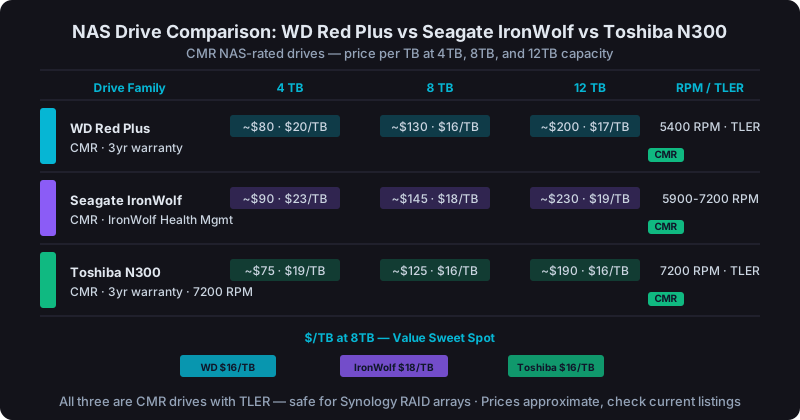
For most Synology NAS builds, WD Red Plus and Seagate IronWolf are the safest choices. Both use CMR recording and are on Synology's official compatibility list. Toshiba N300 is a solid budget alternative. Avoid SMR drives in RAID arrays.
Picking a drive for your NAS sounds simple until you realize there are about a dozen variables that matter: recording technology, vibration compensation, workload rating, warranty, and whether Synology actually tested it. Let's cut through the noise.
Why Desktop Drives Don't Belong in a NAS
A desktop drive like a WD Blue or Seagate Barracuda is designed for single-drive, consumer workloads. A few hours a day, no RAID parity calculations, no sustained multi-drive vibration. When you put one in a 4-bay NAS running RAID 5, it's being asked to do something it wasn't built for.
NAS-rated drives handle three things desktop drives don't:
- Vibration compensation: Multiple spinning drives create harmonic resonance. NAS drives have rotational vibration (RV) sensors that adjust the read/write heads in real time.
- RAID error recovery (TLER): Desktop drives have aggressive error recovery routines that pause I/O for up to 60 seconds trying to read a bad sector. RAID controllers interpret that as a drive failure. NAS drives use Time-Limited Error Recovery. They hand the error back to the controller within a few seconds so RAID can handle it.
- Continuous duty: NAS drives are rated for 24/7 operation at ~180TB/year workload. Desktop drives cap out around 55TB/year.
Put a desktop drive in a Synology running RAID 5 and you're asking for false drive failures, RAID degradation, and potential data loss during rebuild.
CMR vs SMR: The Recording Technology That Kills NAS Performance
Before comparing brands, you need to understand Conventional Magnetic Recording (CMR) vs Shingled Magnetic Recording (SMR).
SMR drives write data in overlapping tracks like roof shingles. Reads are fast, but writes require rewriting entire bands. Which creates massive write amplification under random I/O. In a NAS with multiple concurrent reads and writes, SMR drives can drop to single-digit MB/s sustained write speed.
Worse, SMR drives are nearly unusable during RAID rebuilds. A rebuild on a 4TB SMR drive that should take 10-12 hours can stretch to 40+ hours, leaving your array degraded and exposed to a second failure for days.
CMR drives to use: WD Red Plus (all capacities), Seagate IronWolf (all capacities), Toshiba N300 (all capacities).
SMR drives to avoid in NAS RAID: WD Red (non-Plus, 2-6TB range), some Seagate Barracuda Compute models.
When in doubt, check the manufacturer's product page for "SMR" or "CMR". It's usually listed under specs.
WD Red Plus: The Safe Default
WD Red Plus drives are CMR, carry a 3-year warranty (5-year for Pro), and support 8 drive bays in the standard line. They're consistently on Synology's compatibility list and have a long track record in home and small business NAS builds.
- 4TB WD Red Plus: ~$80, 5400 RPM, 180MB/s sequential read, 64MB cache
- 8TB WD Red Plus: ~$130, 5640 RPM (variable), 210MB/s sequential read
- 12TB WD Red Plus: ~$200, 7200 RPM on higher-capacity models, 256MB cache
The 4TB and 8TB are the sweet spots. You'll find them in Synology's compatibility list for every current NAS model. The Pro line (WD Red Pro) bumps to 7200 RPM and a 5-year warranty. Worth the ~$20 premium if you're running a 6+ bay array with heavy workloads.
Seagate IronWolf: Slightly More Aggressive Specs
IronWolf drives run at 5400-7200 RPM depending on capacity and come with IronWolf Health Management. A drive health monitoring protocol that Synology DSM reads natively. It adds a layer of predictive failure alerting beyond standard S.M.A.R.T.
- 4TB IronWolf: ~$90, 5900 RPM, 180MB/s sequential read, 64MB cache
- 8TB IronWolf: ~$145, 7200 RPM, 210MB/s sequential, 256MB cache
- 12TB IronWolf: ~$230, 7200 RPM, 210MB/s sequential, 256MB cache
IronWolf Pro adds a 5-year warranty and 300TB/year workload rating (vs 180TB/year for standard). If you're running Plex, Surveillance Station, or a business file server, the Pro is worth the premium.
IronWolf typically runs $5-15 more per drive than WD Red Plus at the same capacity. The IronWolf Health Management integration is a real differentiator if you care about proactive monitoring.
Toshiba N300: The Budget Pick That Doesn't Cut Corners
Toshiba N300 drives get overlooked because Toshiba has less brand recognition in the NAS space, but the specs are solid: CMR recording, 24/7 rated, RV sensors on 4+ bay models, and a 3-year warranty.
- 4TB N300: ~$75, 7200 RPM, 128MB cache
- 8TB N300: ~$125, 7200 RPM, 256MB cache
- 12TB N300: ~$190, 7200 RPM, 256MB cache
The N300 line runs at 7200 RPM across the board, which makes sequential read/write faster than 5400 RPM alternatives. The tradeoff is slightly higher power consumption and more heat in a packed enclosure.
One caveat: Toshiba's Synology compatibility list coverage is thinner than WD and Seagate. Always verify your specific NAS model supports the N300 drive capacity you're buying before ordering.
Price vs Capacity Sweet Spots
Here's where value per TB lands at current prices:
| Drive | 4TB | 8TB | 12TB |
|---|---|---|---|
| WD Red Plus | ~$80 ($20/TB) | ~$130 ($16/TB) | ~$200 ($17/TB) |
| Seagate IronWolf | ~$90 ($23/TB) | ~$145 ($18/TB) | ~$230 ($19/TB) |
| Toshiba N300 | ~$75 ($19/TB) | ~$125 ($16/TB) | ~$190 ($16/TB) |
The 8TB tier is the value sweet spot regardless of brand. You get the lowest cost-per-TB and a drive size that's practical for both home and SMB use. A 4-bay Synology with 4×8TB drives in RAID 5 gives you about 21-22TB of usable storage. Enough for most home media servers and small office file shares.
At 12TB+, the N300 and WD Red Plus are nearly identical on $/TB. The IronWolf's premium is harder to justify at that capacity unless you specifically want IronWolf Health Management.
Which Drive for Which Use Case
Home media server (1-4 bays, light workload): WD Red Plus 4TB or 8TB. Proven, affordable, zero compatibility surprises with Synology.
Home server with Plex + Surveillance Station (4-6 bays): Seagate IronWolf 8TB. The Health Management integration and 7200 RPM spinup on larger capacities handles mixed media and surveillance I/O better.
SMB file server (6-8 bays, heavy workload): IronWolf Pro or WD Red Pro at 8TB or 12TB. You want the 5-year warranty and 300TB/year rating when the NAS is business-critical.
Budget home build: Toshiba N300 8TB if your NAS model is on the compatibility list. Identical performance to the name brands at a slight discount.
Check the Compatibility List Before You Buy
Synology publishes a compatibility list at synology.com/en-global/compatibility. Search your NAS model number and then the drive model. If it's not on the list, Synology won't provide support if something goes wrong. And some drives simply don't work correctly with certain controllers.
All three brands covered here have strong Synology compatibility, but specific capacities (especially newer 16TB+ models) sometimes take 6-12 months to appear on the list after release.
Before you buy, calculate your usable storage with the drive count and RAID type you're planning. A 4-bay NAS with 8TB drives in RAID 5 gives ~24TB usable. But in SHR, you might get slightly different results depending on drive combination.
If you're still deciding between SHR and RAID 5, the comparison in SHR vs RAID 5 on Synology covers when each makes more sense. And once you've picked drives, how much storage your Synology NAS needs can help you plan the right starting capacity.